
Download Naomi Animation – 3D animation, AR animation, iPad app, character animation, keyframe animation, augmented reality, creative tools, animation software, 3D character, iPadOS, creative software, animation app
Overview
Naomi Animation is a desktop-like application designed for iPadOS, enabling users to create immersive 3D animations using augmented reality (AR) technology. The software targets creative professionals and enthusiasts who seek a mobile-first solution for 3D character animation. It allows users to bring their ideas to life through intuitive tools and real-time AR visualization. The app supports standard keyframe animation, making it suitable for both beginners and experienced animators. With pre-rigged 3D characters included, users can begin animating immediately without the need for complex setup or modeling. The primary use case involves creating animated content for storytelling, social media, or interactive experiences. The developer, Naomi Labs, appears to focus on bridging the gap between mobile accessibility and professional-grade animation tools. While the developer’s background beyond the name is not detailed, the app’s design suggests a strong emphasis on user experience and creative empowerment. The software is recommended for use with Apple Pencil, enhancing precision and control during animation creation.
Key Features & Capabilities
- Augmented Reality Integration: Allows real-time visualization of 3D animations in physical space using iPad’s AR capabilities. Users can view and adjust animations in context, improving spatial accuracy and creative decision-making.
- Keyframe Animation Support: Provides a standard keyframe workflow for controlling movement, timing, and interpolation. This feature enables smooth, professional-quality animation sequences without requiring advanced coding or scripting.
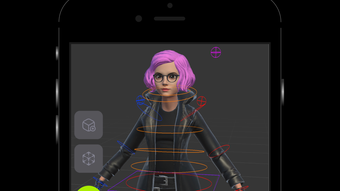
- Pre-Rigged 3D Characters: Includes a library of ready-to-use 3D characters with built-in skeletons and animation controls. This reduces setup time and allows users to focus on storytelling and motion design from the start.
- Apple Pencil Optimization: Designed to leverage the precision and pressure sensitivity of Apple Pencil, offering a natural drawing and animation experience. This enhances control over motion paths, timing, and detail.
- Real-Time Playback: Enables instant playback of animations within the app, allowing users to preview and refine their work without exporting or rendering delays.
These features collectively support a streamlined creative workflow. For example, an animator could sketch a character’s movement using the Apple Pencil, set keyframes for facial expressions and limb motion, and then visualize the result in AR to assess spatial dynamics. This approach is ideal for content creators developing short-form animated stories or interactive AR experiences. The software’s focus on accessibility and immediate usability makes it suitable for educational settings, independent creators, and digital artists exploring mobile animation.
User Interface, Workflow & Performance
The user interface of Naomi Animation is structured to prioritize ease of use and creative flow. The layout appears to be centered around a main canvas area where 3D animations are composed and viewed, with toolbars and timelines positioned for intuitive access. Navigation is likely gesture-based, consistent with iPadOS design standards, allowing users to pan, zoom, and rotate the 3D scene with touch or Apple Pencil input. The workflow emphasizes a linear progression from character selection to animation creation, with clear visual cues for keyframe placement and timeline manipulation.
Performance details were not specified by the developer. However, given the app’s reliance on AR rendering and 3D processing, performance may vary based on device hardware. The developer did not provide additional system requirements. General software behavior patterns suggest that the app may require sufficient RAM and GPU capabilities to maintain smooth animation playback and AR rendering. Stability during long animation sessions is not confirmed. Users should expect occasional lag or frame drops if the device does not meet recommended thresholds, though no specific reports of crashes or freezes were noted.
Compatibility & System Requirements
Naomi Animation is designed exclusively for iPadOS, indicating that it is not compatible with Mac or Windows systems. The app is available in version 1.2.3 and has a download size of 450 MB. This suggests a moderate installation footprint, likely due to the inclusion of 3D assets, animation tools, and AR rendering libraries. The developer did not specify exact hardware requirements, such as minimum processor speed, RAM, or GPU specifications. Compatibility information is limited to the operating system level.
Based on the app’s AR and 3D animation demands, it is recommended to use a newer iPad model with sufficient processing power and a high-resolution display. The developer did not confirm whether older iPad models are supported. Users should verify compatibility with their specific device before installation. The app may require iOS 15 or later, though this was not explicitly stated. The lack of detailed system requirements limits the ability to assess broader accessibility across the iPad ecosystem.
Pros and Cons
Pros
- Intuitive interface tailored for iPadOS and Apple Pencil use
- Pre-rigged 3D characters reduce setup time for new users
- Real-time AR visualization enhances spatial creativity
- Supports standard keyframe animation for professional-quality results
- Optimized for mobile creative workflows with immediate usability
Cons
- Compatibility limited to iPadOS only; no support for Mac or Windows
- Exact system requirements were not listed
- Performance details not provided; may vary across devices
- Price point of $29.99 may be high for casual users
- Limited information on export formats and file compatibility
FAQ Section
Is Naomi Animation compatible with all iPad models?
The app is designed for iPadOS, but the developer did not specify which iPad models are supported. Users should check their device’s capabilities and ensure they meet the minimum requirements, which were not publicly listed.
Can I use Naomi Animation without Apple Pencil?
While the app is optimized for Apple Pencil, it is not confirmed whether touch input alone is sufficient for full functionality. The developer recommends Apple Pencil for the best experience, but basic operations may still be accessible via touch.
Is the software safe to download and use?
Naomi Animation is distributed through official channels, and no security risks were reported. As with any third-party software, users should download only from trusted sources to avoid potential threats.
How often are updates released?
Version 1.2.3 was released on May 15, 2024. The frequency of future updates was not specified by the developer. Users are advised to monitor the app store for new releases.
Does Naomi Animation require an internet connection?
The app appears to function primarily in offline mode, as it is designed for local animation creation and AR rendering. However, the developer did not confirm whether online features, such as cloud sync or updates, are available.
Final Thoughts + CTA
Naomi Animation presents a compelling option for creators seeking a mobile-first platform for 3D and AR animation. Its integration of keyframe animation, pre-rigged characters, and AR visualization offers a unique blend of accessibility and creative power. While the app’s exclusive focus on iPadOS and lack of detailed system requirements may limit its reach, its design and feature set cater effectively to artists and animators who value mobility and precision. The user-friendly interface and Apple Pencil optimization enhance the creative experience, making it suitable for both beginners and professionals. For those invested in the Apple ecosystem and looking to explore 3D animation on a tablet, Naomi Animation delivers a modern, forward-thinking tool. Download Naomi Animation now to begin crafting immersive 3D stories on your iPad.







